> ## Documentation Index
> Fetch the complete documentation index at: https://yieldxyz.mintlify.site/llms.txt
> Use this file to discover all available pages before exploring further.
# Programmatic Access
> Guide to automating project management, API keys, yields, fees, and reports via the Programmatic API
## Overview
This guide walks through every capability of the Yield.xyz Programmatic API. Use it to automate project provisioning, API key lifecycle, yield enablement, fee configuration, and reporting — all without touching the dashboard.
For background on what Programmatic Access is and when to use it, see the [Programmatic Access documentation](/documentation/advanced-setup/dashboard-configuration/programmatic-access).
***
## Prerequisites
Before you begin, you need a **Programmatic Access API Key**:
Go to [dashboard.yield.xyz](https://dashboard.yield.xyz)
Click your avatar (top-right) → **\ Developers**
Click **Create API Key** and store the key securely — it is only displayed once
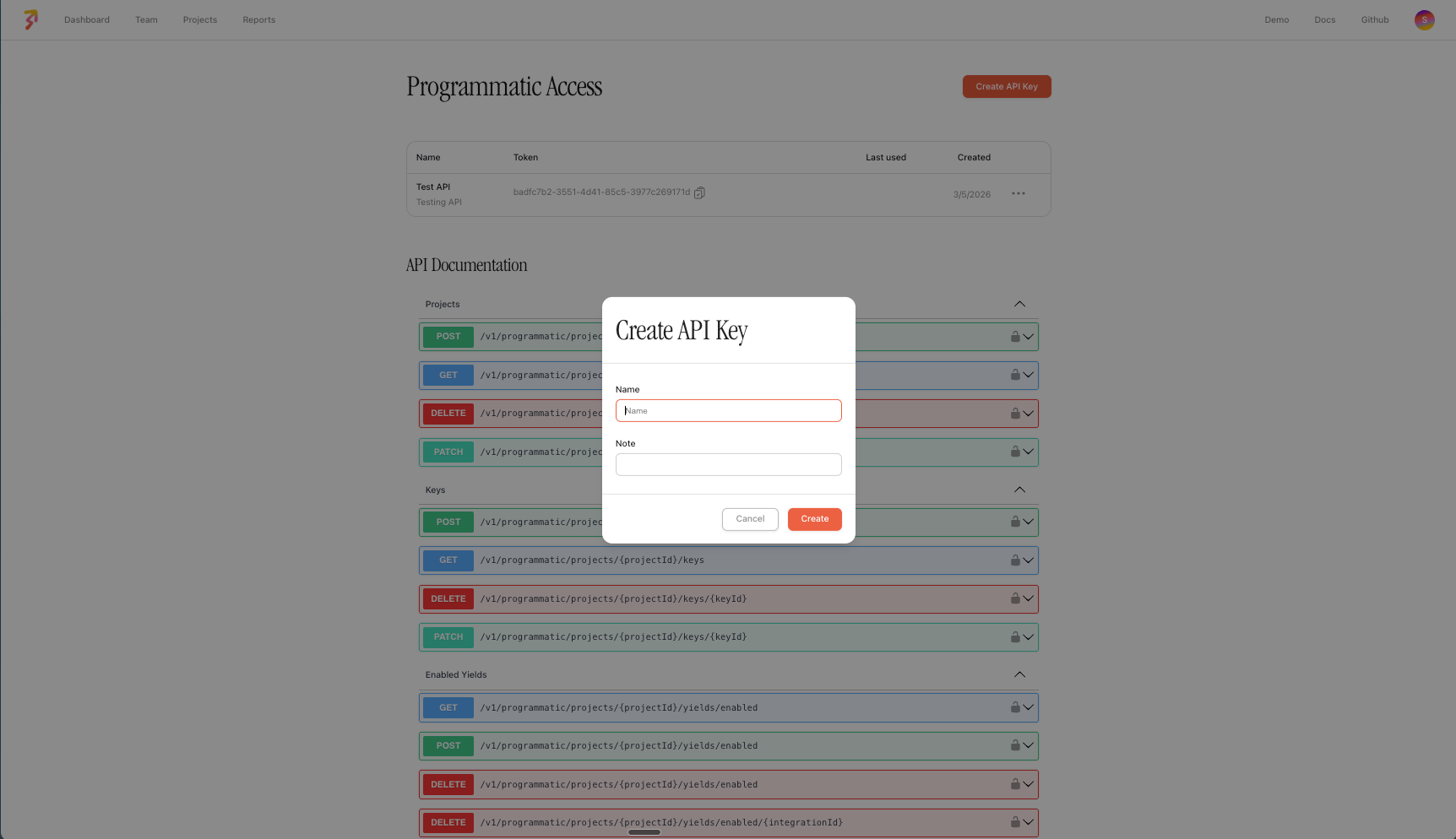 All requests in this guide require the following header:
```bash theme={null}
X-ADMIN-API-KEY:
```
**Base URL:**
```
https://api.stakek.it
```
***
## Projects
A project maps to a logical grouping — typically one per client, workspace, or environment. Each project has its own API keys, enabled yields, and fee configurations.
### Create a Project
```bash theme={null}
curl -X POST https://api.stakek.it/v1/programmatic/projects \
-H "X-ADMIN-API-KEY: " \
-H "Content-Type: application/json" \
-d '{
"name": "Acme Corp",
"description": "Production yield integration"
}'
```
**Response:**
```json theme={null}
{
"id": "b1c2d3e4-...",
"name": "Acme Corp",
"description": "Production yield integration",
"teamId": "a1b2c3d4-...",
"autoComplaintBansEnabled": false,
"createdAt": "2026-03-05T10:00:00.000Z",
"updatedAt": "2026-03-05T10:00:00.000Z",
"deletedAt": null
}
```
### List Projects
```bash theme={null}
curl https://api.stakek.it/v1/programmatic/projects \
-H "X-ADMIN-API-KEY: "
```
Returns all projects belonging to your team.
### Update a Project
```bash theme={null}
curl -X PATCH https://api.stakek.it/v1/programmatic/projects/{projectId} \
-H "X-ADMIN-API-KEY: " \
-H "Content-Type: application/json" \
-d '{
"name": "Acme Corp (Updated)",
"autoComplaintBansEnabled": true
}'
```
| Field | Type | Required | Description |
| -------------------------- | ------- | -------- | ------------------------------------- |
| `name` | string | No | Updated project name |
| `description` | string | No | Updated description |
| `autoComplaintBansEnabled` | boolean | No | Enable/disable auto-ban on complaints |
### Delete a Project
```bash theme={null}
curl -X DELETE https://api.stakek.it/v1/programmatic/projects/{projectId} \
-H "X-ADMIN-API-KEY: "
```
Soft-deletes the project and associated resources.
***
## API Keys
API keys are scoped to a project. These are the keys your application passes to the Yield API (`X-API-KEY` header) for staking, balance, and action requests.
### Create a Key
```bash theme={null}
curl -X POST https://api.stakek.it/v1/programmatic/projects/{projectId}/keys \
-H "X-ADMIN-API-KEY: " \
-H "Content-Type: application/json" \
-d '{
"name": "Production Key",
"info": "Used by backend services"
}'
```
**Response:**
```json theme={null}
{
"id": "k1e2y3...",
"apiKey": "sk_live_32refr-rwer231...",
"name": "Production Key",
"info": "Used by backend services",
"category": "default",
"projectId": "b1c2d3e4-...",
"lastUsedAt": null,
"createdAt": "2026-03-05T10:00:00.000Z",
"updatedAt": "2026-03-05T10:00:00.000Z",
"deletedAt": null
}
```
The `apiKey` value is **only returned at creation time**. Store it securely immediately — you will not be able to retrieve it again.
### List Keys
```bash theme={null}
curl https://api.stakek.it/v1/programmatic/projects/{projectId}/keys \
-H "X-ADMIN-API-KEY: "
```
### Update a Key
```bash theme={null}
curl -X PATCH https://api.stakek.it/v1/programmatic/projects/{projectId}/keys/{keyId} \
-H "X-ADMIN-API-KEY: " \
-H "Content-Type: application/json" \
-d '{
"name": "Updated Key Name",
"info": "Updated metadata"
}'
```
### Delete a Key
```bash theme={null}
curl -X DELETE https://api.stakek.it/v1/programmatic/projects/{projectId}/keys/{keyId} \
-H "X-ADMIN-API-KEY: "
```
Soft-deletes the key. It will no longer authenticate Yield API requests.
***
## Enabled Yields
Control which yield integrations are available for a project. An integration is a specific yield opportunity identified by an `integrationId` (e.g., `ethereum-eth-lido-staking`, `optimism-usdt-aave-v3-lending`).
### List Enabled Yields
```bash theme={null}
curl "https://api.stakek.it/v1/programmatic/projects/{projectId}/yields/enabled?page=1&limit=10" \
-H "X-ADMIN-API-KEY: "
```
**Response:**
```json theme={null}
{
"data": [
{ "integrationId": "ethereum-eth-lido-staking" },
{ "integrationId": "optimism-usdt-aave-v3-lending" }
],
"hasNextPage": false,
"page": 1,
"limit": 10
}
```
| Query Parameter | Type | Default | Description |
| --------------- | ------ | ------- | -------------- |
| `page` | number | 1 | Page number |
| `limit` | number | 10 | Items per page |
### Enable Yields (Bulk)
```bash theme={null}
curl -X POST https://api.stakek.it/v1/programmatic/projects/{projectId}/yields/enabled \
-H "X-ADMIN-API-KEY: " \
-H "Content-Type: application/json" \
-d '[
{ "integrationId": "ethereum-eth-lido-staking" },
{ "integrationId": "optimism-usdt-aave-v3-lending" },
{ "integrationId": "arbitrum-eth-aave-v3-lending" }
]'
```
You can curate **bundles** of yield integrations (e.g., "Stablecoin Conservative", "Blue-chip DeFi") and enable an entire bundle in a single call by passing all the relevant `integrationId` values.
### Disable a Single Yield
```bash theme={null}
curl -X DELETE https://api.stakek.it/v1/programmatic/projects/{projectId}/yields/enabled/{integrationId} \
-H "X-ADMIN-API-KEY: "
```
### Disable Yields (Bulk)
```bash theme={null}
curl -X DELETE https://api.stakek.it/v1/programmatic/projects/{projectId}/yields/enabled \
-H "X-ADMIN-API-KEY: " \
-H "Content-Type: application/json" \
-d '{
"integrationIds": [
"ethereum-eth-lido-staking",
"optimism-usdt-aave-v3-lending"
]
}'
```
***
## Fee Configuration
Configure fees on a per-integration basis within a project. Fees are expressed in **basis points** (bps), where **100 bps = 1%**.
Applying fees may require Yield.xyz to deploy onchain infrastructure (e.g., an OAV or fee wrapper). The fee configuration status reflects this lifecycle: `REQUESTED` → `PROCESSING` → `LIVE`.
### Create a Fee Configuration
```bash theme={null}
curl -X POST https://api.stakek.it/v1/programmatic/projects/{projectId}/fee-configuration \
-H "X-ADMIN-API-KEY: " \
-H "Content-Type: application/json" \
-d '{
"integrationId": "optimism-usdt-aave-v3-lending",
"depositFeeBps": 50,
"performanceFeeBps": 1000
}'
```
This configures a **0.5% deposit fee** and **10% performance fee** on the Aave USDT lending pool on Optimism.
**Response:**
```json theme={null}
{
"id": "fc1e2...",
"projectId": "b1c2d3e4-...",
"integrationId": "optimism-usdt-aave-v3-lending",
"depositFeeBps": 50,
"managementFeeBps": null,
"performanceFeeBps": 1000,
"allocatorVaultContractAddress": null,
"feeWrapperContractAddress": null,
"status": "REQUESTED"
}
```
| Field | Type | Required | Description |
| ------------------- | ------ | -------- | -------------------------------- |
| `integrationId` | string | Yes | Target yield integration |
| `depositFeeBps` | number | No | Deposit fee in bps (1–10000) |
| `managementFeeBps` | number | No | Management fee in bps (1–10000) |
| `performanceFeeBps` | number | No | Performance fee in bps (1–10000) |
### List Fee Configurations
```bash theme={null}
curl "https://api.stakek.it/v1/programmatic/projects/{projectId}/fee-configuration?page=1&limit=10" \
-H "X-ADMIN-API-KEY: "
```
### Update a Fee Configuration
```bash theme={null}
curl -X PATCH https://api.stakek.it/v1/programmatic/projects/{projectId}/fee-configuration/{feeConfigurationId} \
-H "X-ADMIN-API-KEY: " \
-H "Content-Type: application/json" \
-d '{
"performanceFeeBps": 500
}'
```
Pass `null` for a fee field to remove it.
### Delete a Fee Configuration
```bash theme={null}
curl -X DELETE https://api.stakek.it/v1/programmatic/projects/{projectId}/fee-configuration/{feeConfigurationId} \
-H "X-ADMIN-API-KEY: "
```
***
## Reports
Pull transaction and staking activity across all projects belonging to your team. Use query parameters to filter and sort results.
### List Report Entries
```bash theme={null}
curl "https://api.stakek.it/v1/programmatic/report-entries?page=1&limit=10&sort=createdAtDesc" \
-H "X-ADMIN-API-KEY: "
```
| Query Parameter | Type | Description |
| ------------------ | ------ | ----------------------------------------------------------------- |
| `projectId` | string | Filter by project |
| `integrationId` | string | Filter by yield integration |
| `walletAddress` | string | Filter by wallet address |
| `validatorAddress` | string | Filter by validator address |
| `status` | string | Filter by action status (`SUCCESS`, `FAILED`, `PROCESSING`, etc.) |
| `type` | string | Filter by action type (`STAKE`, `UNSTAKE`, `CLAIM_REWARDS`, etc.) |
| `sort` | string | `createdAtAsc` or `createdAtDesc` |
| `page` | number | Page number |
| `limit` | number | Items per page |
**Response:**
```json theme={null}
{
"data": [
{
"address": {
"address": "0xabc..."
},
"action": {
"id": "act-123",
"integrationId": "ethereum-eth-lido-staking",
"type": "STAKE",
"status": "SUCCESS",
"amount": "1.5",
"USDAmount": "4500.00",
"createdAt": "2026-02-20T12:00:00.000Z",
"completedAt": "2026-02-20T12:05:00.000Z"
},
"metadata": {
"name": "Lido Staking",
"type": "liquid-staking"
}
}
],
"hasNextPage": true,
"page": 1,
"limit": 10
}
```
***
## Recommended Provisioning Flow
A typical integration follows this sequence when onboarding a new client or workspace:
`POST /v1/programmatic/projects` — one project per client or workspace
`POST /v1/programmatic/projects/{projectId}/keys` — the key is used by the client or your backend to call the Yield API
`POST /v1/programmatic/projects/{projectId}/yields/enabled` — enable a curated set of yield integrations
`POST /v1/programmatic/projects/{projectId}/fee-configuration` — apply deposit, management, or performance fees
`GET /v1/programmatic/report-entries` — pull activity data for reconciliation and analytics
***
## Fee Configuration Lifecycle
When a fee configuration is created, it may go through several statuses before becoming active:
| Status | Description |
| ------------------- | ------------------------------------------------------------------------------- |
| `REQUESTED` | Fee configuration has been submitted |
| `PROCESSING` | Yield.xyz is deploying the required onchain infrastructure (OAV or fee wrapper) |
| `LIVE` | Fee configuration is active and being applied |
| `CHANGES_REQUESTED` | An update has been requested and is being processed |
Some fee configurations require Yield.xyz to deploy a dedicated **Optimized Allocator Vault (OAV)** or fee wrapper contract onchain. This is handled automatically — the `status` field reflects the deployment progress.
***
## OpenAPI Specification
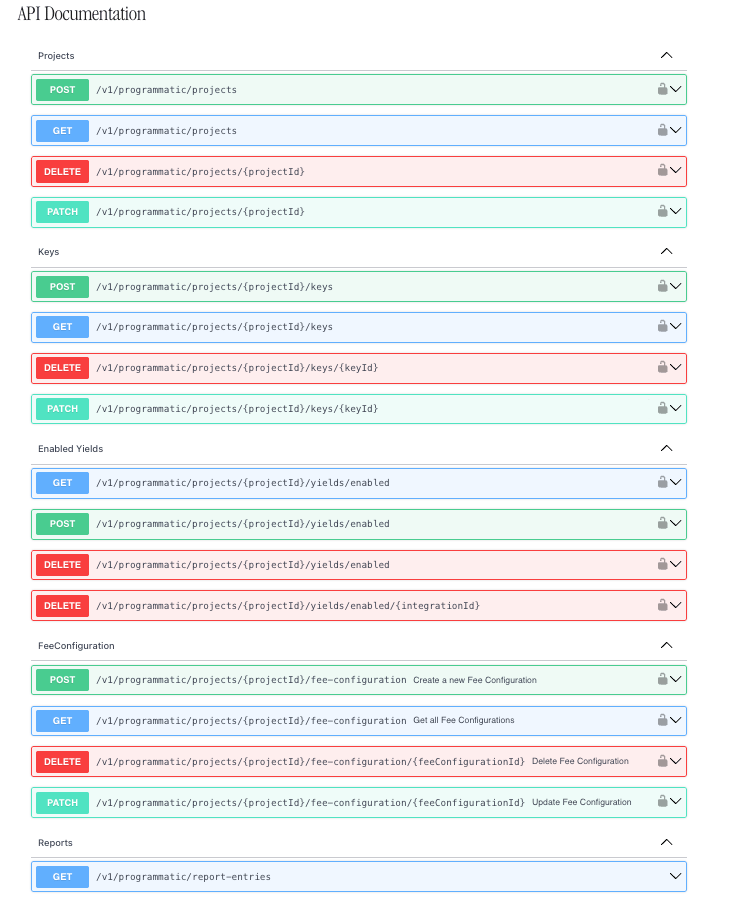
The full OpenAPI specification for the Programmatic API is available directly in the Yield.xyz dashboard:
1. Log in to [dashboard.yield.xyz](https://dashboard.yield.xyz)
2. Click your avatar → **\ Developers**
3. The OpenAPI spec is displayed in the developer section
All requests in this guide require the following header:
```bash theme={null}
X-ADMIN-API-KEY:
```
**Base URL:**
```
https://api.stakek.it
```
***
## Projects
A project maps to a logical grouping — typically one per client, workspace, or environment. Each project has its own API keys, enabled yields, and fee configurations.
### Create a Project
```bash theme={null}
curl -X POST https://api.stakek.it/v1/programmatic/projects \
-H "X-ADMIN-API-KEY: " \
-H "Content-Type: application/json" \
-d '{
"name": "Acme Corp",
"description": "Production yield integration"
}'
```
**Response:**
```json theme={null}
{
"id": "b1c2d3e4-...",
"name": "Acme Corp",
"description": "Production yield integration",
"teamId": "a1b2c3d4-...",
"autoComplaintBansEnabled": false,
"createdAt": "2026-03-05T10:00:00.000Z",
"updatedAt": "2026-03-05T10:00:00.000Z",
"deletedAt": null
}
```
### List Projects
```bash theme={null}
curl https://api.stakek.it/v1/programmatic/projects \
-H "X-ADMIN-API-KEY: "
```
Returns all projects belonging to your team.
### Update a Project
```bash theme={null}
curl -X PATCH https://api.stakek.it/v1/programmatic/projects/{projectId} \
-H "X-ADMIN-API-KEY: " \
-H "Content-Type: application/json" \
-d '{
"name": "Acme Corp (Updated)",
"autoComplaintBansEnabled": true
}'
```
| Field | Type | Required | Description |
| -------------------------- | ------- | -------- | ------------------------------------- |
| `name` | string | No | Updated project name |
| `description` | string | No | Updated description |
| `autoComplaintBansEnabled` | boolean | No | Enable/disable auto-ban on complaints |
### Delete a Project
```bash theme={null}
curl -X DELETE https://api.stakek.it/v1/programmatic/projects/{projectId} \
-H "X-ADMIN-API-KEY: "
```
Soft-deletes the project and associated resources.
***
## API Keys
API keys are scoped to a project. These are the keys your application passes to the Yield API (`X-API-KEY` header) for staking, balance, and action requests.
### Create a Key
```bash theme={null}
curl -X POST https://api.stakek.it/v1/programmatic/projects/{projectId}/keys \
-H "X-ADMIN-API-KEY: " \
-H "Content-Type: application/json" \
-d '{
"name": "Production Key",
"info": "Used by backend services"
}'
```
**Response:**
```json theme={null}
{
"id": "k1e2y3...",
"apiKey": "sk_live_32refr-rwer231...",
"name": "Production Key",
"info": "Used by backend services",
"category": "default",
"projectId": "b1c2d3e4-...",
"lastUsedAt": null,
"createdAt": "2026-03-05T10:00:00.000Z",
"updatedAt": "2026-03-05T10:00:00.000Z",
"deletedAt": null
}
```
The `apiKey` value is **only returned at creation time**. Store it securely immediately — you will not be able to retrieve it again.
### List Keys
```bash theme={null}
curl https://api.stakek.it/v1/programmatic/projects/{projectId}/keys \
-H "X-ADMIN-API-KEY: "
```
### Update a Key
```bash theme={null}
curl -X PATCH https://api.stakek.it/v1/programmatic/projects/{projectId}/keys/{keyId} \
-H "X-ADMIN-API-KEY: " \
-H "Content-Type: application/json" \
-d '{
"name": "Updated Key Name",
"info": "Updated metadata"
}'
```
### Delete a Key
```bash theme={null}
curl -X DELETE https://api.stakek.it/v1/programmatic/projects/{projectId}/keys/{keyId} \
-H "X-ADMIN-API-KEY: "
```
Soft-deletes the key. It will no longer authenticate Yield API requests.
***
## Enabled Yields
Control which yield integrations are available for a project. An integration is a specific yield opportunity identified by an `integrationId` (e.g., `ethereum-eth-lido-staking`, `optimism-usdt-aave-v3-lending`).
### List Enabled Yields
```bash theme={null}
curl "https://api.stakek.it/v1/programmatic/projects/{projectId}/yields/enabled?page=1&limit=10" \
-H "X-ADMIN-API-KEY: "
```
**Response:**
```json theme={null}
{
"data": [
{ "integrationId": "ethereum-eth-lido-staking" },
{ "integrationId": "optimism-usdt-aave-v3-lending" }
],
"hasNextPage": false,
"page": 1,
"limit": 10
}
```
| Query Parameter | Type | Default | Description |
| --------------- | ------ | ------- | -------------- |
| `page` | number | 1 | Page number |
| `limit` | number | 10 | Items per page |
### Enable Yields (Bulk)
```bash theme={null}
curl -X POST https://api.stakek.it/v1/programmatic/projects/{projectId}/yields/enabled \
-H "X-ADMIN-API-KEY: " \
-H "Content-Type: application/json" \
-d '[
{ "integrationId": "ethereum-eth-lido-staking" },
{ "integrationId": "optimism-usdt-aave-v3-lending" },
{ "integrationId": "arbitrum-eth-aave-v3-lending" }
]'
```
You can curate **bundles** of yield integrations (e.g., "Stablecoin Conservative", "Blue-chip DeFi") and enable an entire bundle in a single call by passing all the relevant `integrationId` values.
### Disable a Single Yield
```bash theme={null}
curl -X DELETE https://api.stakek.it/v1/programmatic/projects/{projectId}/yields/enabled/{integrationId} \
-H "X-ADMIN-API-KEY: "
```
### Disable Yields (Bulk)
```bash theme={null}
curl -X DELETE https://api.stakek.it/v1/programmatic/projects/{projectId}/yields/enabled \
-H "X-ADMIN-API-KEY: " \
-H "Content-Type: application/json" \
-d '{
"integrationIds": [
"ethereum-eth-lido-staking",
"optimism-usdt-aave-v3-lending"
]
}'
```
***
## Fee Configuration
Configure fees on a per-integration basis within a project. Fees are expressed in **basis points** (bps), where **100 bps = 1%**.
Applying fees may require Yield.xyz to deploy onchain infrastructure (e.g., an OAV or fee wrapper). The fee configuration status reflects this lifecycle: `REQUESTED` → `PROCESSING` → `LIVE`.
### Create a Fee Configuration
```bash theme={null}
curl -X POST https://api.stakek.it/v1/programmatic/projects/{projectId}/fee-configuration \
-H "X-ADMIN-API-KEY: " \
-H "Content-Type: application/json" \
-d '{
"integrationId": "optimism-usdt-aave-v3-lending",
"depositFeeBps": 50,
"performanceFeeBps": 1000
}'
```
This configures a **0.5% deposit fee** and **10% performance fee** on the Aave USDT lending pool on Optimism.
**Response:**
```json theme={null}
{
"id": "fc1e2...",
"projectId": "b1c2d3e4-...",
"integrationId": "optimism-usdt-aave-v3-lending",
"depositFeeBps": 50,
"managementFeeBps": null,
"performanceFeeBps": 1000,
"allocatorVaultContractAddress": null,
"feeWrapperContractAddress": null,
"status": "REQUESTED"
}
```
| Field | Type | Required | Description |
| ------------------- | ------ | -------- | -------------------------------- |
| `integrationId` | string | Yes | Target yield integration |
| `depositFeeBps` | number | No | Deposit fee in bps (1–10000) |
| `managementFeeBps` | number | No | Management fee in bps (1–10000) |
| `performanceFeeBps` | number | No | Performance fee in bps (1–10000) |
### List Fee Configurations
```bash theme={null}
curl "https://api.stakek.it/v1/programmatic/projects/{projectId}/fee-configuration?page=1&limit=10" \
-H "X-ADMIN-API-KEY: "
```
### Update a Fee Configuration
```bash theme={null}
curl -X PATCH https://api.stakek.it/v1/programmatic/projects/{projectId}/fee-configuration/{feeConfigurationId} \
-H "X-ADMIN-API-KEY: " \
-H "Content-Type: application/json" \
-d '{
"performanceFeeBps": 500
}'
```
Pass `null` for a fee field to remove it.
### Delete a Fee Configuration
```bash theme={null}
curl -X DELETE https://api.stakek.it/v1/programmatic/projects/{projectId}/fee-configuration/{feeConfigurationId} \
-H "X-ADMIN-API-KEY: "
```
***
## Reports
Pull transaction and staking activity across all projects belonging to your team. Use query parameters to filter and sort results.
### List Report Entries
```bash theme={null}
curl "https://api.stakek.it/v1/programmatic/report-entries?page=1&limit=10&sort=createdAtDesc" \
-H "X-ADMIN-API-KEY: "
```
| Query Parameter | Type | Description |
| ------------------ | ------ | ----------------------------------------------------------------- |
| `projectId` | string | Filter by project |
| `integrationId` | string | Filter by yield integration |
| `walletAddress` | string | Filter by wallet address |
| `validatorAddress` | string | Filter by validator address |
| `status` | string | Filter by action status (`SUCCESS`, `FAILED`, `PROCESSING`, etc.) |
| `type` | string | Filter by action type (`STAKE`, `UNSTAKE`, `CLAIM_REWARDS`, etc.) |
| `sort` | string | `createdAtAsc` or `createdAtDesc` |
| `page` | number | Page number |
| `limit` | number | Items per page |
**Response:**
```json theme={null}
{
"data": [
{
"address": {
"address": "0xabc..."
},
"action": {
"id": "act-123",
"integrationId": "ethereum-eth-lido-staking",
"type": "STAKE",
"status": "SUCCESS",
"amount": "1.5",
"USDAmount": "4500.00",
"createdAt": "2026-02-20T12:00:00.000Z",
"completedAt": "2026-02-20T12:05:00.000Z"
},
"metadata": {
"name": "Lido Staking",
"type": "liquid-staking"
}
}
],
"hasNextPage": true,
"page": 1,
"limit": 10
}
```
***
## Recommended Provisioning Flow
A typical integration follows this sequence when onboarding a new client or workspace:
`POST /v1/programmatic/projects` — one project per client or workspace
`POST /v1/programmatic/projects/{projectId}/keys` — the key is used by the client or your backend to call the Yield API
`POST /v1/programmatic/projects/{projectId}/yields/enabled` — enable a curated set of yield integrations
`POST /v1/programmatic/projects/{projectId}/fee-configuration` — apply deposit, management, or performance fees
`GET /v1/programmatic/report-entries` — pull activity data for reconciliation and analytics
***
## Fee Configuration Lifecycle
When a fee configuration is created, it may go through several statuses before becoming active:
| Status | Description |
| ------------------- | ------------------------------------------------------------------------------- |
| `REQUESTED` | Fee configuration has been submitted |
| `PROCESSING` | Yield.xyz is deploying the required onchain infrastructure (OAV or fee wrapper) |
| `LIVE` | Fee configuration is active and being applied |
| `CHANGES_REQUESTED` | An update has been requested and is being processed |
Some fee configurations require Yield.xyz to deploy a dedicated **Optimized Allocator Vault (OAV)** or fee wrapper contract onchain. This is handled automatically — the `status` field reflects the deployment progress.
***
## OpenAPI Specification
The full OpenAPI specification for the Programmatic API is available directly in the Yield.xyz dashboard:
1. Log in to [dashboard.yield.xyz](https://dashboard.yield.xyz)
2. Click your avatar → **\ Developers**
3. The OpenAPI spec is displayed in the developer section
 ***
## Next Steps
Overview of capabilities and authentication
Learn more about how fees work in Yield.xyz
Understand project and key concepts
Learn about Optimized Allocator Vaults
***
## Next Steps
Overview of capabilities and authentication
Learn more about how fees work in Yield.xyz
Understand project and key concepts
Learn about Optimized Allocator Vaults